
SMS Terms & Consent
Dreamphase, Version 1.1, Last Updated: February 23, 2026
Summary
When you enter your phone number in Dreamphase, consent language is displayed directly in the phone authentication sheet before you tap “Send OTP.” By tapping that button, you expressly consent to receive text messages containing one-time password (OTP) codes for account verification. You can opt out anytime by replying STOP or switching to email authentication.
SMS Consent Overview
Dreamphase uses SMS text messaging solely for account authentication purposes. When you sign up or log in using a phone number, you will receive one-time password (OTP) codes via text message.
How Consent Works
Consent to receive SMS messages is collected at the point of phone number entry through a dedicated, standalone opt-in; it is not bundled into the general Terms of Service acceptance.
In-App Consent Flow
When you choose phone authentication in Dreamphase, a phone authentication sheet appears where you enter your number. Directly on that sheet, before the “Send OTP” button, the following consent language is displayed:
In-app consent language
“By tapping ‘Send OTP,’ you agree to receive automated text messages for authentication at this number. Message frequency varies. Msg & data rates may apply. Reply STOP to opt out, HELP for help. Consent is not a condition of using Dreamphase. See our SMS Terms.”
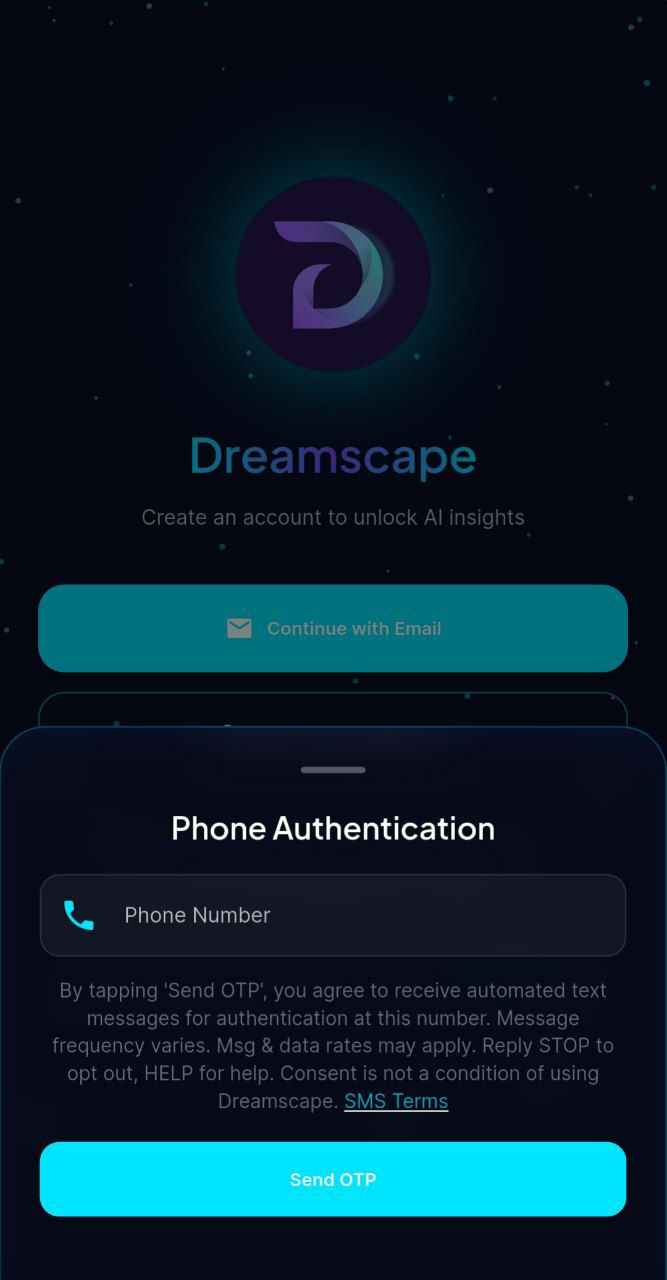
You provide consent by:
- Entering your phone number in the phone authentication sheet
- Reviewing the consent disclosure displayed directly above the “Send OTP” button
- Tapping “Send OTP”, this action constitutes your express consent to receive SMS messages
This opt-in is separate from and independent of the general Terms of Service acceptance. You must affirmatively take the action of tapping “Send OTP” after seeing the consent language to begin receiving messages.
What You’re Consenting To
By providing your phone number for SMS authentication, you expressly consent to:
- Receive automated text messages containing one-time password (OTP) codes
- Message frequency: Varies based on your login activity (typically 1–5 messages per week)
- Message service provider: Messages are sent via Twilio
- No marketing messages: We only send authentication codes, no promotional content
Sample Messages
Every SMS we send begins with the brand identifier Dreamphase notice: so you always know who the message is from. Typical verification messages look like this:
Verification code
“Dreamphase notice: Your one-time passcode is: 123456. Reply HELP for help, STOP to opt out.”
“Dreamphase notice: Your verification code is: 123456. Expires in 10 minutes. Reply STOP to opt out.”
Message and Data Rates
Standard message and data rates may apply based on your mobile carrier’s plan. Dreamphase does not charge for SMS messages, but your carrier may. Contact your carrier for details about your messaging plan.
Carriers are not liable for delayed or undelivered messages.
How to Opt Out
You can stop receiving SMS messages at any time by:
- Reply by text: Reply STOP to any message from us. You can also reply with STOPALL, UNSUBSCRIBE, CANCEL, END, QUIT, OPTOUT, or REVOKE
- In the app: Go to Settings → Account → Authentication Method → Switch to Email
- Delete account: Deleting your account stops all messages
After texting STOP, you will receive a confirmation message: “You have successfully been unsubscribed. You will not receive any more messages from this number. Reply START to resubscribe.”
HELP keyword
Reply HELP to any message at any time to receive support contact information. You will receive:
“Dreamphase: For help, contact support@gestaltmind.dev. Msg & data rates may apply. Reply STOP to opt out.”
Note: Opting out of SMS means you must use email for authentication. You cannot use SMS login after opting out unless you opt back in through app settings or by replying START to resubscribe.
SMS is Optional
You are not required to use SMS authentication. Email authentication is always available as an alternative. Consent to receive SMS is not a condition of using Dreamphase.
Privacy and Data
Your phone number is used only for authentication. We do not:
- Share your phone number with third parties (except Twilio for SMS delivery)
- Use your phone number for marketing
- Store your messages or OTP codes after they expire
- Request the Android
READ_SMSpermission or read your SMS inbox
OTP Autofill
To make code entry easier, Dreamphase uses your operating system's built in one time code autofill:
- Android: the SMS User Consent API (provided by Google Play services). When an OTP message arrives shortly after you tap "Send OTP", Android shows a system dialog asking your permission to share that single message with Dreamphase. The verification code is then filled in for you. Dreamphase never sees any other SMS messages and never has direct access to your inbox.
- iOS: the standard
oneTimeCodeautofill hint. iOS surfaces the code as a keyboard suggestion when you focus the OTP field. The matching itself happens entirely on device.
You can ignore these prompts and type the code in by hand at any time. Autofill is purely a convenience and is never required to complete sign in.
See our Privacy Policy for more information about how we handle your data.
Supported Carriers
SMS authentication works with all major US carriers and most international carriers. If you experience issues receiving messages, contact your carrier to ensure SMS is enabled on your plan.
Help and Support
For help with SMS authentication or to change your authentication method:
- Technical support: support@gestaltmind.dev
- Change authentication: Use the app settings to switch between SMS and email
Relationship to Terms of Service
These SMS Terms supplement our Terms of Service. However, SMS consent itself is collected separately through the in-app phone authentication flow described above; it is not part of the general Terms of Service acceptance.
Contact Information
GestaltMind LLC
Email: support@gestaltmind.dev
Website: gestaltmind.dev